The Component Registry Model
Sep 26, 2026 · @Oussama A component registry hands you the source of the one component you asked for , not a package with every dependency, version, and abstraction layer bundled in. npm ships everyth…
- September 26, 2026
- 05 min
Sep 26, 2026 · @Oussama
A component registry hands you the source of the one component you asked for , not a package with every dependency, version, and abstraction layer bundled in.
npm ships everything. A registry ships one thing.
An npm package is a black box: you install it, it lands in node_modules, and you import from it. Every dependency it needs comes along for the ride, version-pinned and hidden away.
// Traditional npm package , you get a compiled artifact, not the source
import { Button } from 'some-ui-library'
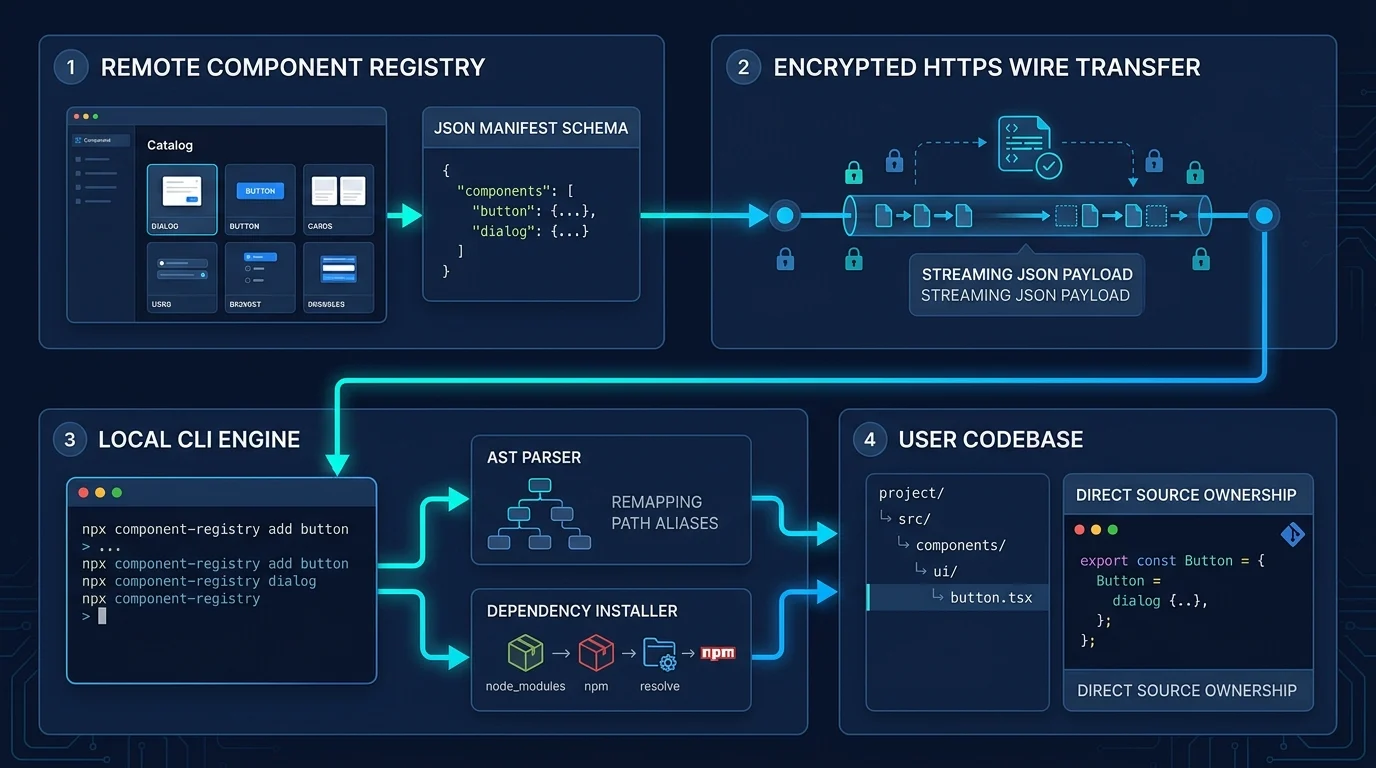
A component registry works differently. It's a distribution repo of component source and metadata, but it only ever hands over the one component you asked for. Nothing gets bundled in on your behalf.
// Registry-based component , the CLI writes the actual source into your repo
// src/components/ui/button.tsx now contains the full implementation
import { Button } from '@/components/ui/button'
The difference isn't cosmetic. some-ui-library is a dependency you upgrade, patch around, and eventually outgrow. button.tsx is a file in your project. You can open it, and nothing stops you from changing it.
Anatomy of a registry item
Every component in a registry is described by a small JSON file sitting next to its source. Here's a real one announcement, a compound badge component:
{
  "name": "announcement",
  "description": "A compound badge component designed to display announcements with theming support",
  "dependencies": ["class-variance-authority", "lucide-react"],
  "registryDependencies": ["badge"],
  "files": ["announcement.tsx"],
  "type": "component",
  "category": "ui"
}
Each field earns its keep:
| Field | What it does |
|---|---|
name |
Maps straight to the terminal command npx shadcn add announcement |
description |
What npx shadcn search shows before you download anything |
dependencies |
npm packages the CLI installs for you if they're missing |
registryDependencies |
Other registry components this one is built on |
files |
The actual source file(s) the CLI fetches and writes locally |
type / category |
Tells the CLI which folder to write into, via your local components.json |
Nothing here is downloaded speculatively. The metadata exists so the CLI can make exactly the decisions a package manager makes what to install, where, and in what order without shipping a package.
Two dependency lists, two different jobs
dependencies and registryDependencies look similar but resolve differently, and pulling a real ShadTable component shows both at once. Here's the registry entry for editable-table:
{
  "name": "editable-table",
  "description": "Inline cell editing with per-cell validation, optimistic updates against a simulated save, and single-step undo.",
  "dependencies": ["@tanstack/react-table"],
  "registryDependencies": ["table", "button", "input"]
}
Run npx shadcn add editable-table and two things happen before a single line of your app code changes:
dependenciestriggers npm.@tanstack/react-tableisn't in yourpackage.json? The CLI runs the install for you.registryDependenciestriggers chaining. The CLI checks whether you already havetable.tsx,button.tsx, andinput.tsx. Any that are missing get fetched and written first theneditable-table.tsxlands on top of them.
ShadTable's pivot-table shows the same pattern with a different shape of data: registryDependencies: ["table", "select"], because a pivot table is really a table primitive plus select dropdowns for choosing which dimension becomes a row and which becomes a column. You never manually install three components to get one , you ask for the one you want, and its dependency graph resolves itself.
What it buys the developer
You own the code, not a version of it. There's no [email protected] to bump, no changelog to read before upgrading, no black box to eject from when a table needs to do something the author never anticipated. The file is yours the moment it's written.
Extending a component means editing it, not fighting it. Need a tree table with custom row actions? Open tree-table.tsx and add them. Nothing is hidden behind fifteen props threaded through a do-everything <DataTable> . ShadTable deliberately keeps each table type as its own small set of components for exactly this reason.
The dependency graph is visible before you install anything. registryDependencies isn't a black box either , it's metadata you can read. You know that editable-table pulls in table, button, and input before you type the install command, not after.
What it buys the team
Bundle size tracks what you actually use. A data-table install writes one small set of files. It doesn't drag along the tree-table, pivot-table, and heatmap-table code paths just because they live in the same registry, each component's files list is its own contract.
Every install reuses what's already in the design system. Because registryDependencies points at other registry components rather than duplicating their code, editable-table and pivot-table both build on the same table primitive already installed for data-table. The whole app keeps one visual language instead of three slightly different table implementations accumulating over time.
Nothing arrives compiled. Every file the CLI writes is source you can read start to finish before it runs , no minified bundle standing between "what the docs say it does" and "what's in your repo."
Finding the right component before you install it
None of this is useful if picking a component means guessing. Registry sites pair the metadata with:
Live, interactive previews not screenshots
Full documentation and ready-to-copy code snippets
Search and filtering by type, dependency, or category
ShadTable organizes its whole catalog this way, grouped by what shape your data is in rather than a flat feature list Data Table for the base client-side case, SSR for pagination and filtering that hits the server, Structure / Hierarchy for trees, groups, and pivots, Interaction-heavy for reordering and inline editing, and Dashboard / Analytics for KPI, comparison, and heatmap variants. Once you've found the one that fits, installing it is one command:
npx shadcn add https://shad-table.dev/r/pivot-table.json
That single line resolves table and select from the registry, installs @tanstack/react-table from npm if it's missing, and writes the pivot table's source into your project , fully readable, fully yours, and not one file more than what you asked for.